Address
Caochang Industrial Area, Liguang Rd, Lishui, Nanhai, Foshan, Guangdong, China
Phone:
0086-20-8938 9313
0086-757-8938 9313
Email:
Work Hours
Monday to Friday: 8AM - 10PM
24x7 online service

Address
Caochang Industrial Area, Liguang Rd, Lishui, Nanhai, Foshan, Guangdong, China
Phone:
0086-20-8938 9313
0086-757-8938 9313
Email:
Work Hours
Monday to Friday: 8AM - 10PM
24x7 online service
Custom LED Light Box & SEG Display Manufacturer
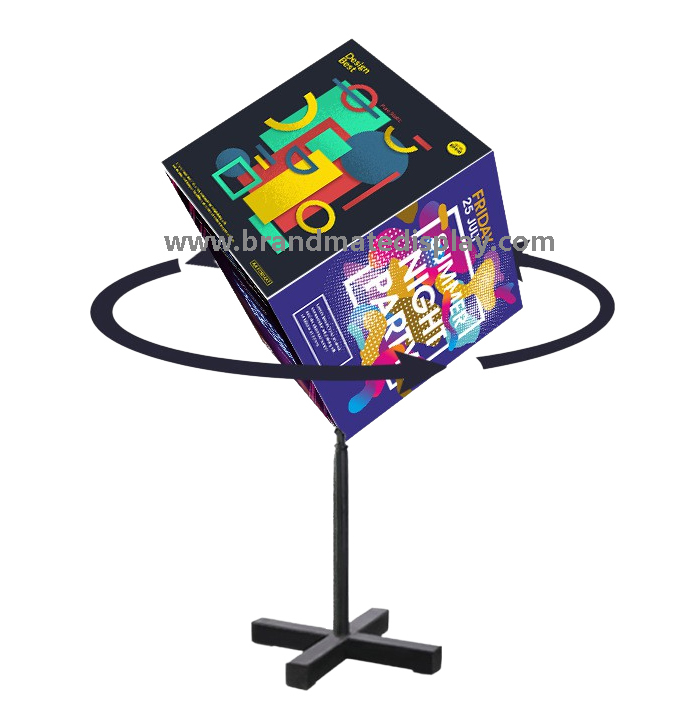
A custom rotating printed sign is easier to order when the desired display, offered configuration and approved sample all describe the same assembly. This guide helps display distributors and project buyers turn a visual idea into an RFQ, reconcile the drawing and component list, and control changes before a repeat order.
Quick answer: send BrandMate Display the required outside size, a simple face-and-artwork plan, quantity and installation context. Ask for an identified model proposal showing what is included, what still needs review and which drawing, graphic template and component-list revisions the quotation uses. Approve the fitted sample against those references before authorizing the final production scope.
Start with the message and viewing directions. State whether the brief requires fixed printed faces, mechanically rotating printed faces or electronic content. A printed light box does not acquire video playback or electronic scheduling because its lighting uses LEDs. Record the intended movement and operating pattern as requirements to be confirmed for the offered model.
Identify the proposed location, available space, indoor or exposed conditions, cleaning context, destination and the party responsible for installation. Separate requirements that are essential from preferences that can change after a feasibility discussion. A preferred shape, height or number of faces is an input to that review, rather than proof that every combination can be supplied.
For several variants, list each size and quantity separately and identify the differences. This allows the proposal to show which parts, drawings and graphics belong to each variant instead of treating one photograph as a specification for the entire order.
A dimensioned sketch should show the complete assembly, visible printed area, frame depth and any support projection. Agree measurement units and reference points. For a proposed multi-section display, identify the sections and their arrangement; confirm the actual number of physical faces from the offered drawing rather than assuming a fixed image capacity.
Add a face map with a label for each printed panel, its viewing orientation and its artwork file. Show which edge is the top and whether a logo or small text must remain inside a clear visible area. Ask for the production template and attachment details before finalizing artwork dimensions. A front-facing mockup is useful for appearance but does not establish the finished print size or the graphic-change method.
Show mounting interfaces, cable exit and service openings on the same drawing set. Refer the actual site support, moving envelope and fixing responsibilities to the rotating-signage mounting guide and the responsible installer. This custom-order brief does not approve a structural design or convert a floor model into a wall or overhead model.
| Buyer input | Reference to request | Decision before approval |
|---|---|---|
| Finished size and position | Outside dimensions, visible area, depth, support and service-space drawing. | The offered assembly fits the agreed site constraints; unresolved interfaces are identified. |
| Printed messages | Labelled face map, artwork register and production template. | Every supplied graphic matches a physical panel, orientation and approved file. |
| Required movement | Quoted mechanism/control scope and model-specific operating instructions. | The offered function addresses the brief; controls and limits are confirmed rather than inferred. |
| Power and installation | Destination electrical configuration, cable exit and mounting-interface references. | The responsible qualified installer has the information needed for the actual site review. |
| Quantity and delivery | Variant quantities, itemized supply scope and installation-kit/packing list. | The quote identifies supplied parts, buyer-supplied work and project-specific commercial terms. |
Ask for a bill of materials, or an adequately detailed supplied-component schedule, tied to the offered model and revision. The list should identify the frame and support, printed-face material and attachment, lighting, driver, movement components where used, power accessories and included hardware. Record the actual material and finish references; do not infer them from a similar-looking catalog image.
Distinguish included parts from installation work, locally selected fixings, spare graphics and optional components. A lower unit price may cover a different base, graphic scope or electrical accessory. Reconcile those differences before comparing the total proposal. Ask which part references can be used for future replacements and which remain to be confirmed.
Confirm sample cost, any tooling charge, MOQ, production and shipment dependencies, warranty scope and available spare-part terms in the quotation. Keep these commercial terms linked to the actual configuration. This guide does not supply standard prices, quantities, dates or warranty promises.
Give each drawing, face template and component list a revision reference. The quotation and sample request should identify the same references. Before approving, check whether the outside dimensions, panel labels, cable exit and included hardware agree across the documents. Resolve a mismatch in the source documents rather than leaving the teams to interpret conflicting screenshots.
For example, a changed frame depth may affect a rear fixture interface, cable access and the component arrangement; a changed printed-face size may require a new template and fitted proof. Record the change and update the affected references together. A new drawing file should not silently leave an old artwork template or component list as the production basis.
Use clear decisions: proposed, approved for the stated scope, or awaiting a named correction. Identify the buyer’s drawing/artwork decision owner and the people responsible for technical and installation review. A finish sample can approve a finish without approving the full operating assembly; state the limited scope rather than treating every sample as a complete production reference.
Suppose a buyer asks for a deeper frame after receiving the first proposal. The following document labels are illustrative, not BrandMate model numbers or a completed customer order. The useful question is whether the next quotation, drawing, face template and sample still describe one configuration.
| Reference | What the buyer receives | What closes the review |
|---|---|---|
| Quotation Q02 and drawing D02 | The revised proposal identifies the new outside depth, supplied configuration and affected installation interfaces. | The buyer confirms the quoted scope against D02; the installer reviews the changed site interface where needed. |
| Face template T01 | The old template is still attached to the proposal. | The technical reviewer either confirms T01 remains valid and records why, or issues the replacement template. The artwork team uses the accepted reference. |
| Component schedule C02 | The changed frame and any affected supports, lighting or movement parts are identified. | The schedule reconciles with D02 and the quoted supply list; substitutions have an explicit compatibility decision. |
| Sample S01 | The sample was made to the earlier drawing D01. | Record which observations still apply and obtain the checks needed for D02. Approval of an unchanged finish does not approve the new geometry or operation. |
Close the change with one written production-reference list and a named approval decision. Send the superseded files to an archive rather than leaving both revisions in the active production folder. The outcome is a clearer order: purchasing knows what is priced, artwork knows which template to use, and receiving knows which kit to expect.
Inspect the offered assembly against its drawing and component list. Measure the specified reference points, compare the visible finish and joints, and confirm which graphic files are fitted to which faces. Retain labelled photographs and the sample identity. For illuminated graphics, use the intended viewing conditions and an agreed appearance reference.
For a proposed rotating configuration, have responsible personnel follow the model instructions and record the agreed movement, clearance, cable arrangement and access for changing graphics. Qualified personnel must handle electrical or service checks that expose components. Do not improvise wiring, moving-part adjustments or suspended support from a promotional photograph.
A sample result should say what was checked, the requirement, the observation and the decision. If a panel obscures important text or a component differs from the quoted list, identify the affected drawing/file/part and request a documented correction. Repeat the affected check on the corrected configuration. An attractive front photograph alone does not close a dimensional or operating mismatch.
The light box sample-approval guide supplies the broader inspection checklist. For this custom order, keep the result attached to the exact drawing, face map and component revisions that it approves.
Ask for a proposed change to be described before it enters production. Record the reason, old and new reference, affected variants and the review needed. The buyer and technical owner can then decide whether to accept the change, retain the previous specification or request a revised sample. Update the production basis only after that decision is recorded.
| Proposed change | References to reconcile | Useful recheck before acceptance |
|---|---|---|
| Outside size or section arrangement | Assembly drawing, support/site interfaces, face map and packing proposal. | Dimensional fit and the affected operating/installation review for the new configuration. |
| Printed-face material or attachment | Material reference, production template and graphic-change instructions. | Fitted print, visible area, illuminated appearance and replacement sequence. |
| Lighting, driver or movement component | Component list, relevant electrical/mechanical documents and access drawing. | Qualified compatibility review and the operating or appearance checks affected by the substitution. |
| Artwork or face orientation | File version, labelled face map and approved lit reference. | Correct panel assignment, upright orientation, readable content and fitted color appearance. |
| Base, bracket or installation kit | Supported assembly, fixing interface, kit list and responsible installer review. | Actual interface, safe access, kit completeness and any revised site requirements. |
Apply the same discipline to an order split into variants or delivery groups. A change accepted for one configuration does not automatically apply to the others. Keep the approved variant and quantity schedule with the final supply list so the packing and receiving teams can identify what belongs together.
Ask the packing proposal to protect the actual printed faces, support parts and moving components, and identify each assembly’s accessories. Record the packed dimensions and gross weights when reviewing freight. At receiving, compare carton labels, part counts and artwork references with the approved kit list before mixing parts from different variants.
Keep the model instructions, cleaning method, graphic template and part references with the installed unit. Follow the specified care method for the actual face and finish; do not assume every print tolerates the same cleaner. Use qualified personnel for electrical service and other work identified in the instructions.
For a reorder, send the prior approved configuration, drawing/component revisions, artwork files and new quantities. Identify any changed site, power or operating requirement. Confirm compatibility and quote scope again where parts or requirements have changed. Reusing an outside dimension does not establish that an earlier graphic, bracket or driver remains suitable.
Use it to explain the appearance you want, then add dimensions, a face map and installation context. Ask for a feasible model proposal and drawings. Confirm hidden parts, motion controls, materials and the available size range in the offered configuration.
Confirm the physical panel and section arrangement in the offered drawing. Match each supplied artwork to its panel label. The number of printed faces is different from the number of electronic files a digital display can schedule.
Identify the mismatch and agree which configuration is being approved. Update the drawing, template and component references together, then repeat any affected sample check before production approval.
State which variants the evidence covers. Ask what needs separate dimensional, appearance, operating or installation review for the other sizes. A shared finish or graphic theme does not automatically approve every assembly.
Send BrandMate Display the required size, quantity, printed-message plan and proposed location. Add an available sketch or reference image. Feasibility, sample scope, commercial terms and more detailed documents can be clarified in the project discussion.
Start with the rotating LED signage product page and send the actual customization requirements. Use quality control to discuss which sample evidence should accompany the proposal. Request an identified configuration and written scope rather than assuming that a pictured format supplies every requested option.
Discuss your custom-sign brief on WhatsApp or email the requirements to BrandMate Display. The initial form can stay simple; detailed drawings, face files and component questions belong in the follow-up.
Send the required size, quantity and printed-face plan. Ask which drawing, sample and component references can support the offered configuration.