Address
Caochang Industrial Area, Liguang Rd, Lishui, Nanhai, Foshan, Guangdong, China
Phone:
0086-20-8938 9313
0086-757-8938 9313
Email:
Work Hours
Monday to Friday: 8AM - 10PM
24x7 online service

Address
Caochang Industrial Area, Liguang Rd, Lishui, Nanhai, Foshan, Guangdong, China
Phone:
0086-20-8938 9313
0086-757-8938 9313
Email:
Work Hours
Monday to Friday: 8AM - 10PM
24x7 online service
Custom LED Light Box & SEG Display Manufacturer
Custom LED magic mirror advertising light boxes combine a printed illuminated image with a mirror effect. Project buyers must define the default view, sensor-triggered change, reset delay, graphic/image count, installation and electrical configuration before quotation.
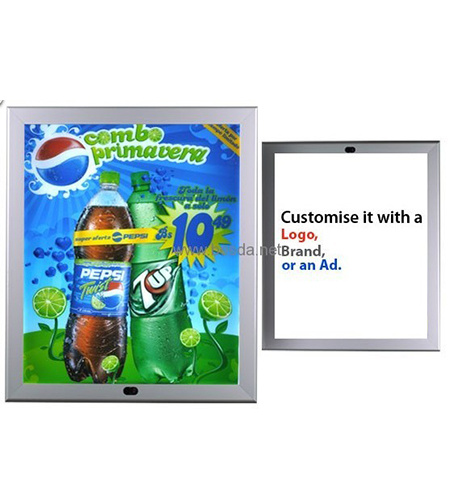
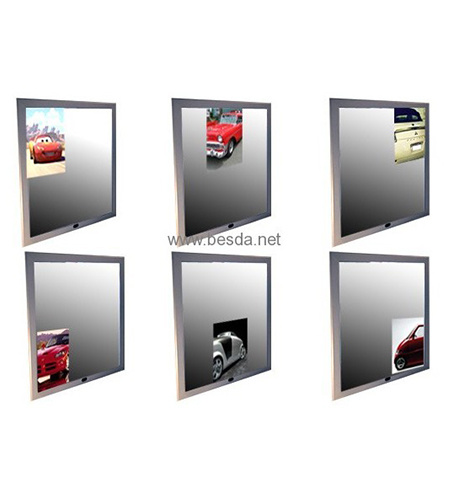
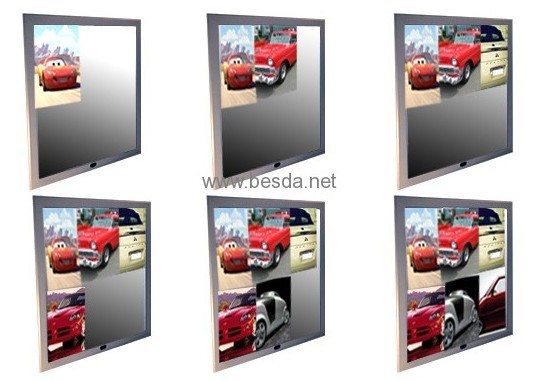
A light-box system that combines an advertising graphic and reflective mirror effect, using a sensor/controller to switch states. Its job is an interactive interior advertising experience. It is not by default a smart bathroom mirror, touchscreen or transparent digital video screen.
Retail fitting areas, shop interiors, restaurant/bar installations, hotel lobbies and branded activations where visitors approach the display. Site traffic and sensor placement matter as much as panel appearance.
| Buyer requirement | Decide before quotation |
|---|---|
| What does the visitor see first? | Poster by default or mirror by default |
| What happens on approach? | Poster→mirror or mirror→poster |
| Too many false triggers? | Sensor position/distance and traffic condition |
| Effect resets too soon? | Hold/reset delay and repeat-trigger logic |
| Multiple graphics? | Actual supported image count by model |
| Feature | Earlier BrandMate references |
|---|---|
| Sizes | A1 / A2 / A3 / A4; approx. 580×680, 800×600, 1100×400 and 800×400 mm concepts |
| Frame finishes | Silver, black and wood-look concepts |
| Image settings | 1, 2, 4 and 6-image configurations mentioned in legacy models |
| Detection range, timing, power | Must be confirmed by current model / test |
Poster-to-mirror: the advertisement is normally visible, then the mirror appears when the visitor approaches. Mirror-to-poster: the reflective view appears first, with an advert revealed on trigger. Choose one behavior deliberately rather than assuming the two are the same.
Define target detection range, sensor position, installation height, nearby reflective surfaces and pedestrian traffic. An aisle may cause repeated false triggers; a fitting area has different visitor behavior.
Define how long the triggered state remains, whether it resets after the visitor leaves, and how the system behaves when another person approaches immediately. These are functional acceptance criteria, not marketing features.
Selected legacy configurations describe one or several image positions. Confirm current model support, image order, artwork sizes, control logic and whether different frames use different image-count limitations.
Confirm overall dimensions, visible mirror and advertising areas, depth, finish and any glass/acrylic handling requirements. Request appearance photos for the exact model, including both default and triggered states.
Specify wall/built-in installation, cable exit, voltage, driver/controller location, power switching and access to the sensor after fitting. A serviceable control panel should not be buried behind inaccessible wall finishes.
Record power-on/default state; approach from the specified distance; correct trigger state; hold/reset; repeated approach cycles; basic false-trigger checks; image alignment; mirror finish; driver/cable operation; and packing. Exact acceptance values are agreed by model.
Check scratches, graphic registration, border fit and image visibility in the actual lighting environment. Interactive effect claims should be demonstrated in a current model video or sample where practical.
Mirror-like surfaces, acrylic and control electronics need separate protection. Cushion face and corners, immobilize electrical hardware and label mounting accessories. Confirm actual carton dimensions, weight and destination packing needs.
| Field | Specification |
|---|---|
| Display | Overall size and graphic/mirror area |
| Effect | Default and triggered states, image count |
| Sensor | Detection distance, reset/dwell logic |
| Installation | Wall/built-in, sensor and cable positions |
| Electrical/order | Destination voltage, quantity and deadline |
A crystal/acrylic LED poster holder presents a static illuminated graphic. A magic mirror adds reflective effect and sensor/control behavior. Use a regular poster light box if interactive switching does not benefit the customer journey.
We focus on defining the requested interaction and verifying a model’s behavior, graphics, electrical configuration and packing before a bulk order. Refer to factory and QC pages for process information and request current sample evidence for specialized sensor options.
The product family includes that concept; define the precise trigger and reset sequence for the quoted model.
Some earlier configurations list multi-image arrangements, but image count must be confirmed per current model.
Not by default. The page covers sensor-triggered advertising and mirror effects, not general digital smart-mirror features.
Send required size, default and triggered modes, detection/reset requirements, image count, installation, destination, voltage, quantity and deadline. Include a reference video or drawing where possible.
Related: LED Crystal Display · LED Magnetic Light Box · Quality Control · Factory Tour