Address
Caochang Industrial Area, Liguang Rd, Lishui, Nanhai, Foshan, Guangdong, China
Phone:
0086-20-8938 9313
0086-757-8938 9313
Email:
Work Hours
Monday to Friday: 8AM - 10PM
24x7 online service

Address
Caochang Industrial Area, Liguang Rd, Lishui, Nanhai, Foshan, Guangdong, China
Phone:
0086-20-8938 9313
0086-757-8938 9313
Email:
Work Hours
Monday to Friday: 8AM - 10PM
24x7 online service
Custom LED Light Box & SEG Display Manufacturer
 Byadminn
An illuminated menu board can look convincing in a photograph and still be wrong for its location. Some operators replace posters several times a week; others need a premium acrylic presentation for months. If a quote calls all three products “LED light boxes,” the purchasing team must compare their construction and access methods before choosing.
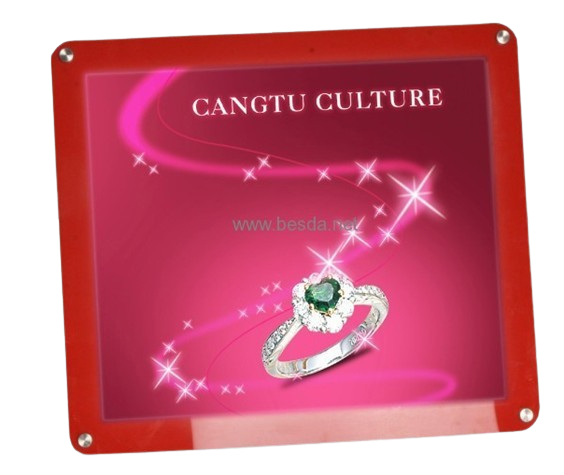
Acrylic crystal displays emphasize clear presentation elements around a static illuminated poster. Magnetic-front light boxes focus on opening a front panel to reach the print. Snap-frame LED light boxes typically use opening perimeter profiles to hold a removable graphic. These are illuminated print products, not video screens.
Will a staff member replace an A3 menu behind a counter every morning, or will a technician change a high-wall retail poster quarterly? The frequency and access conditions often matter more than the decorative frame name.
On BrandMate’s product page, “LED Crystal Display” refers to an acrylic illuminated static-poster light box. It is not a flexible transparent LED video mesh or digital display. For a technical quote, identify clear acrylic parts, edge detailing, mounting and poster access instead of using the word crystal alone.
Magnetic designs can simplify poster access where the actual product uses a removable front cover. Buyers should ask how the cover is lifted, how it is retained and whether the selected print thickness is suitable. Test repeated access before ordering large quantities for daily-changing menus.
A snap frame generally has perimeter profiles that open to release a poster, then close to hold it. Compare corner finish, spring resistance, front clearance, poster alignment and whether staff can open all sides at the installation location.
An A3 poster size does not prove that the complete frame has A3 outside dimensions. Confirm overall W×H, insert/poster W×H and visible image W×H separately. Also request orientation, print bleed and covered margin.
Crystal-style products may use clear acrylic and decorative standoffs; snap frames commonly use aluminum perimeter profiles; magnetic units can combine frame and magnetic front elements. Actual acrylic grade, surface finish, aluminum profile and cover construction remain model-specific.
The access mechanism does not specify whether illumination uses an edge light guide or another LED arrangement. Ask the supplier for electrical load, driver configuration, uniformity evidence and the installation depth for the complete unit.
Acrylic fronts can suit hospitality interiors or real-estate listings where the surrounding detail matters. Snap frames can suit high-turnover promotional posters, while magnetic fronts may suit frequently updated information. Match the mechanism to the brand’s desired finish and daily workflow.
Wall mounting, suspension and countertop placement require different safety checks. A hanging crystal unit needs verified suspension hardware; a high-mounted snap frame needs accessible opening clearance; a desktop magnetic stand needs adequate base stability.
Discuss the actual poster film/paper specification, environmental temperature and whether the illumination or enclosure affects it. Avoid assuming any printed material will remain flat or visually identical under every lighting system.
Frame colors may include silver, black or project-specific decorative finishes, depending on the model. If the retailer demands a repeatable finish, use an approved sample and identify the finish process and acceptance criteria. Do not publish universal color availability without confirmation.
A wall poster and a window or suspended sign need different viewing assumptions. Confirm whether both faces illuminate and how the cable, bracket and graphic-loading arrangement work. A single-sided product photographed from the rear should not be sold as double-sided without a separate specification.
Simulate real graphic-change frequency. Check corner sharpness, acrylic scratching, snap-edge wear, magnetic cover retention and accidental parts loss. A strong buying decision depends on consistent performance during the planned operating cycle, not just the first opening.
Use cleaning materials compatible with acrylic and coated frame finishes. Power down before electrical servicing; keep adapters and cables away from spills and customer traffic. For repeat print changes, provide instructions with the finished unit.
| Family | Essential QC question |
|---|---|
| Crystal | Is acrylic scratch-free, correctly cut and protected in packing? |
| Magnetic | Does the front remove and reseat consistently with the selected poster? |
| Snap frame | Do all sides open and close without misalignment? |
| All | Is lighting acceptable and is the supplied graphic the right size? |
Acrylic needs surface protection and separation from metal hardware. Snap-frame corners and springs need protection against impact. Magnetic faces should not rub against loose adapters. Confirm carton tests where your distribution channels require them; do not imply every shipment passed a particular drop standard.
Estimate initial hardware, printing, install time, replacement frequency, cleaning, breakage and spare parts. A luxury decorative unit may be justified in a flagship interior but inefficient for a price list changed daily by several employees.
| Requirement | Crystal | Magnetic | Snap |
|---|---|---|---|
| Clear decorative presentation | Often relevant | Depends on design | Usually secondary |
| Frequent print changes | Check access design | Evaluate front opening | Evaluate snap opening |
| High-wall installation | Verify mounting/servicing | Verify front access | Verify opening clearance |
| Acrylic surface protection | Important | Model-dependent | Model-dependent |
Send quantity, poster and overall dimensions, location photographs, graphic-change frequency, installation method, electrical market, color/finish requirement, desired artwork and deadline. Request a sample or short access demonstration for a multi-location order.
Is a crystal display a digital LED screen? No; this BrandMate family describes an illuminated acrylic print holder.
Are magnetic frames faster to change than snap frames? It depends on the actual access design, location and operator. Test a sample rather than assuming a universal winner.
Can I use outdoor locations? Only if the exact unit is designed and documented for that exposure.
Can frame sizes be customized? Many light-box families allow project-specific dimensions subject to engineering and quantity review.
Send your poster size, quantity, desired appearance, replacement frequency, installation location, power standard and delivery target. Ask us to compare appropriate models by drawings and sample-access steps, not just catalog images. Review LED Crystal Display, LED Counter Display and LED Snap Frame.
For your required light box dimensions and specification, email BrandMate Display with the installation location, graphic size and how often the poster will change. Confirm the opening method, fixing details and service clearance for the quoted configuration.