Address
Caochang Industrial Area, Liguang Rd, Lishui, Nanhai, Foshan, Guangdong, China
Phone:
0086-20-8938 9313
0086-757-8938 9313
Email:
Work Hours
Monday to Friday: 8AM - 10PM
24x7 online service

Address
Caochang Industrial Area, Liguang Rd, Lishui, Nanhai, Foshan, Guangdong, China
Phone:
0086-20-8938 9313
0086-757-8938 9313
Email:
Work Hours
Monday to Friday: 8AM - 10PM
24x7 online service
Custom LED Light Box & SEG Display Manufacturer
Choose an LED cube by how its message is produced, presented and changed. Illuminated printed faces, physical rotation and electronic video need different product evidence.
For campaign buyers, exhibition agencies and display importers, a useful approval starts with the content task. Decide whether staff will replace a print, whether a printed message should move through the viewing area, or whether the image itself must change electronically. Then ask for the exact proposed hardware to demonstrate that task. The word LED identifies neither a video capability nor a rotating mechanism.
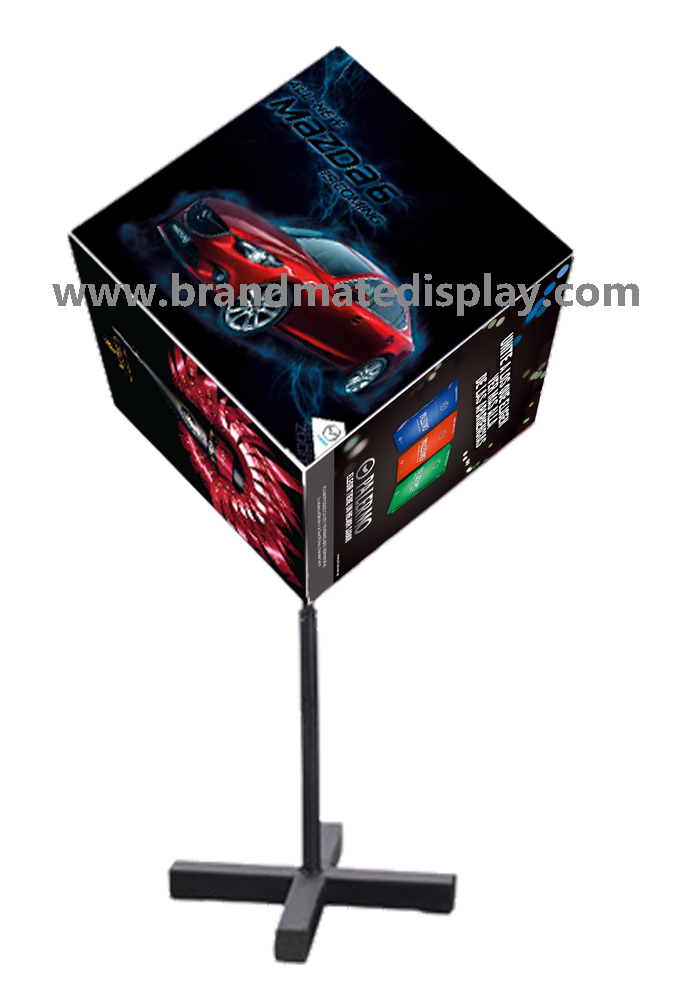
This photograph shows a cube-format display with advertising faces above a floor support. It illustrates the shape, not a demonstrated operating function. The BrandMate LED Cube Display family discusses illuminated graphics and static or model-specific rotating configurations. Video-display availability and capabilities require separate product confirmation; the photograph does not establish illumination, a motor or programmable screens.
Write the required visitor experience before naming a product. A message may remain unchanged for a campaign, appear on several physical sides, move as the structure turns, or change within the same visible surface. Identify which of these functions is essential and which is optional. A cube-shaped housing can look similar across proposals while the content work is entirely different.
Describe the update event as a task: who changes what, from where, using which material or file, and how the team confirms the intended message is visible. State the expected change frequency and available staff access. Frequent changes are a reason to compare workflows; they do not by themselves establish that a particular electronic system is necessary, available or suitable.
Include the kind of content the viewer must use. A product photograph, a short offer, a continuously needed price and a moving demonstration have different requirements. If important information must remain visible continuously, say so explicitly. The number of messages prepared for a campaign is different from the number of physical faces on the unit.
For example, replacing a seasonal printed offer and switching a price electronically during the day are two different update briefs. This is a planning comparison, not a reported BrandMate installation. Keep the chosen task in the enquiry so a quote for lighting or physical movement cannot silently stand in for an electronic content requirement.
A printed illuminated cube uses physical graphics as its image surface. LEDs provide light; replacing the image requires the appropriate graphic-change procedure. A rotating printed cube adds mechanical movement, presenting its physical graphics from changing directions. That movement does not turn those graphics into video.
A digital video cube requires electronic image-generating surfaces and an appropriate content system. Its supported playback, updates and control functions depend on the actual complete product. Lighting, physical movement and electronic image generation should each be identified in the offer; a proposed combination needs evidence for every requested function.
| Proposed format | How the message changes | Evidence to request | Decision boundary |
|---|---|---|---|
| Stationary illuminated printed cube | Staff replace physical graphics using the selected model’s access and attachment method. | Actual graphic construction, instructed changeover and fitted lit sample. | Confirm which faces illuminate; light alone does not demonstrate electronic playback. |
| Mechanically rotating printed cube | The unit presents physical graphics through movement; new artwork still requires physical replacement. | Identified printed-face construction and demonstration of the proposed mechanism and operating settings. | Rotation, controls and supported operation are model-specific; moving the housing does not update its printed content. |
| Separately confirmed digital video system | An electronic system changes the displayed image through its supported content workflow. | Confirmed product availability, complete system identification and a demonstration with the required campaign content and update task. | Do not assume BrandMate offers this system or any particular playback, scheduling or remote-update feature. |
Compare a suitable workflow, not an assumed technology hierarchy. Physical prints may suit a campaign whose messages change through planned print replacements. Electronic image changes may be essential for another brief. Compare the actual update work, operating requirements and quoted scope after availability and capability are confirmed. No universal cheapest or most effective cube format follows from the name.
Request an unambiguous written description of what the offer uses for its images, lighting and any physical movement. Tie it to an exact product or assembly reference. Ask which parts and functions the proposal includes and which are still subject to review. A render, edited promotional animation or video of another model cannot settle the capability of the quoted assembly.
For a printed proposal, confirm the actual graphic material, attachment and change access, together with the illuminated faces. For a rotating proposal, separately confirm the movement system and available operating options through the maker’s instructions and demonstration. Do not infer adjustable speed, stop positions, reverse movement or independent sections from a product photograph.
If electronic playback is essential, ask BrandMate first whether a suitable actual product can be proposed. Only after availability is confirmed should the responsible technical reviewer assess its image surfaces, content input and control arrangement, power configuration, service needs and supported functions. Request written limits for the complete proposed system instead of treating an LED label or a component description as a video specification.
Describe required video, still images, scheduled changes, coordinated faces or off-site updates individually when they matter. The technical reviewer should confirm the necessary file/output requirements, operator workflow, dependencies and included support against that exact system. None of these features is established for BrandMate by this guide. Keep an unsupported essential function open and request a revised proposal before accepting the architecture.
Agree a demonstration plan that identifies the proposed unit, content task, operator, viewing positions and acceptance decision. Use the intended campaign material or a representative version containing the details that matter to the buyer. A decorative image can show appearance while leaving the essential update task unanswered.
For physical graphics, ask the intended operator to demonstrate the instructed removal and replacement using the actual face construction. Record access needs, handling and whether the intended new message is correctly displayed after the change. Keep detailed file preparation and face assignment in the separate artwork approval record. The decision here is whether the proposed method suits the required campaign change.
For a required rotating configuration, have responsible personnel operate the identified assembly according to its instructions while observers remain clear of moving parts. Record whether the demonstrated presentation provides the requested physical movement and usable message visibility from the planned positions. Keep the unit and operating reference visible in the evidence. A camera moving around a stationary cube does not demonstrate a rotating mechanism.
For a separately confirmed digital proposal, have the responsible operator demonstrate the required campaign content and the actual update route on that system. Show the earlier message, carry out the agreed update, then show the intended new message on the proposed display. If scheduled changes or coordinated faces are essential, include those specific tasks in the plan. A clip playing on another device does not establish playback or update capability on the quoted cube.
Where a restart or loss-of-connection response matters, ask the technical provider to define a suitable check using the actual instructions and authorized personnel. Record what content appears and what operator action is needed under the agreed conditions. Do not create improvised wiring, network or power interruptions. A successful recorded demonstration supports its stated task and conditions; it is not evidence of endurance, a universal availability level or compliance.
Record the requirement, offered function and actual observation separately. This helps the team distinguish a wrong product architecture from a content-file issue, an operating-setting issue or an incomplete demonstration. Ask the relevant technical owner to identify the correction; a renamed product or a more attractive mockup does not close a missing function.
| Required task | Observation to record | Review or correction | What closes the item |
|---|---|---|---|
| Change the image electronically | The proposal demonstrates only printed faces, lighting or physical rotation. | Clarify whether a suitable electronic system is actually available; revise the proposal or agree a different requirement explicitly. | Confirmed appropriate offer and a demonstrated electronic update on its identified hardware. |
| Present printed faces through physical movement | Only a stationary sample, camera movement or animation is shown. | Request the actual proposed mechanism and its instructed operating demonstration. | Recorded operation of the identified assembly against the agreed presentation task. |
| Make campaign changes with the intended team | The update needs unplanned access, tools, service work or an unsupported control route. | Review the method, responsibilities and actual available configuration. | Accepted instructions and repeated change task with the agreed operator and resources. |
| Display the required campaign content | The demonstration uses different content or omits an essential playback, timing or viewing task. | Identify the missing task and ask the technical owner for a suitable corrected demonstration. | Observed result on the exact proposed system, with content/operating references and approval decision. |
Keep the original issue and the corrected observation linked to the same requirement. A buyer may accept a simpler workflow after reviewing the tradeoff, but record that as an agreed change. It is different from proving the originally requested function. If the corrected proposal changes the architecture, review the affected content, operating and service requirements again.
Identify the person who prepares campaign material, the person who changes or publishes it, and the person who confirms the live message. Record the approved update instructions and the scope staff can perform. Physical print replacement, a supported electronic content update and electrical or mechanical service are different activities with different access and skill needs.
Ask which parts or services are included in the actual offer and which must be arranged locally. For any separately confirmed electronic system, clarify required accounts, software, connectivity, permissions and ongoing support only where those items apply. Their inclusion, cost and availability must be written into the proposal; this guide does not establish a standard software package or remote service.
Have the responsible installer and technical provider review the selected architecture’s power, space, support, access and maintenance requirements. Use qualified personnel for electrical work and other service identified by the instructions. A floor-standing image does not approve overhead suspension or a public moving installation. The architecture decision should identify the required site review, not substitute for it.
For repeat campaigns, retain the instructions and references needed to repeat the accepted update task. Recheck the affected function when the display, content system, operating method or site conditions change. Do not carry an earlier printed-face approval over to a new electronic configuration or assume that a similarly shaped replacement uses the same update process.
Close the architecture decision with the required message behavior, identified product, image surface, illuminated faces, any mechanical movement, update method, demonstrated content task and remaining technical conditions. State the approved scope and unresolved items, with the responsible reviewer and date. Keep it with the offer so the purchasing decision describes a function the proposed system can actually demonstrate.
Send BrandMate a short description of what the message must do, how and by whom it must change, the intended viewing/location context, required size, quantity and destination. State electronic playback explicitly when essential, and ask whether an appropriate product can be proposed. Availability, exact specifications, sample scope, commercial terms and timing require project confirmation.
Use BrandMate Quality Control to frame the requested acceptance records and Warehouse & Logistics to discuss the selected system’s packing and handover. Confirm the actual provisions for the proposed product; general process pages do not establish electronic capabilities or completed test results.
Lighting a physical print does not provide electronic video playback. If video is required, obtain confirmation of a suitable actual electronic display and demonstrate the required content on that complete proposed system. BrandMate video-product availability remains a separate enquiry.
No. The recording may show printed graphics or physical rotation. Identify what creates the image, then ask for the required electronic content change on the actual proposed hardware if that is part of the brief.
Describe the frequency, staff access, required content and acceptable change process first. Compare feasible confirmed workflows against those needs. No update frequency alone establishes the right product or proves that a suitable electronic option is available.
Explore the BrandMate LED Cube Display family and identify the content or operating questions your project needs answered.
Tell BrandMate about the display and where it will be used. Share drawings and detailed specifications during the project discussion.