Address
Caochang Industrial Area, Liguang Rd, Lishui, Nanhai, Foshan, Guangdong, China
Phone:
0086-20-8938 9313
0086-757-8938 9313
Email:
Work Hours
Monday to Friday: 8AM - 10PM
24x7 online service

Address
Caochang Industrial Area, Liguang Rd, Lishui, Nanhai, Foshan, Guangdong, China
Phone:
0086-20-8938 9313
0086-757-8938 9313
Email:
Work Hours
Monday to Friday: 8AM - 10PM
24x7 online service
Custom LED Light Box & SEG Display Manufacturer
Send the printer the approved insert template for the exact LED snap frame, and check the finished poster inside that frame before releasing replacements. Keep outer dimensions, trimmed poster size and the closed-frame visible opening separate.
This guide helps print resellers, retail graphics teams and signage distributors prevent an artwork crop or insert-fit mismatch after a snap-frame format has been selected. A nominal poster format alone does not specify the frame footprint, the concealed edge or the material that will fit the offered construction.
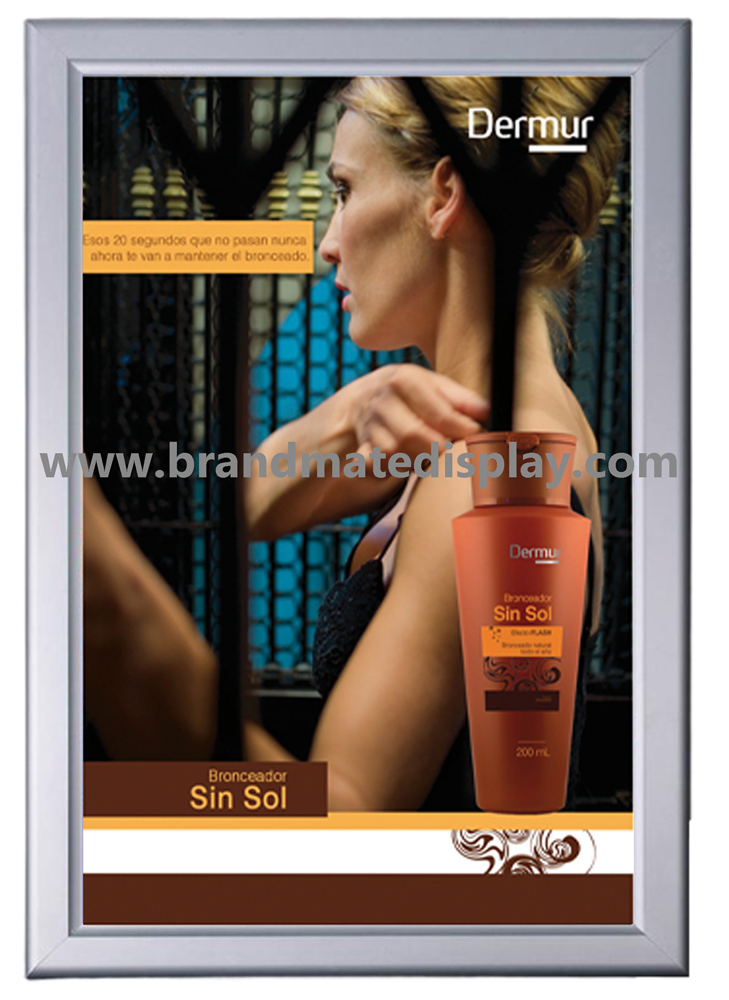
The photograph shows a slim illuminated poster frame from the BrandMate LED Snap Frame family. Use the quoted model drawing and opening instructions to confirm its actual construction; the closed front photograph does not reveal opening clearance, retention details or hidden layer thickness.
Identify the frame model/profile, drawing revision and intended portrait or landscape orientation first. Record each dimension with its units and reference points. The contractor needs the physical outside dimensions, the print team needs the accepted insert cut size, and the artwork owner needs the area that remains visible after closure. Do not substitute one field for another because a quotation uses a familiar nominal format.
| Reference | What it controls | Evidence to agree | When it needs correction |
|---|---|---|---|
| Outer frame dimensions | Closed frame footprint for the intended orientation and fit-out. | Exact model/profile drawing, units, outside measuring points and installation layout. | The unit or adjacent fixture does not fit the agreed layout; review the frame/site drawing rather than resizing the poster. |
| Finished insert dimensions | The physical poster after trimming that is accepted by the selected frame. | Approved cut-sheet dimensions/tolerance, substrate/thickness and template revision. | The actual sheet buckles, shifts or will not sit as instructed; compare cut size, material stack and frame reference before reprinting. |
| Visible opening | The artwork actually exposed when the frame and specified front layers are closed. | Model-specific aperture drawing and an inserted sample showing all four boundaries. | A required word, price, logo or code is hidden; resolve the template/crop and repeat the closed-frame proof. |
| Artwork safe area and bleed | Placement of essential content inside the agreed visible area; print bleed beyond the trim where required by the print workflow. | Separate trim, visible and safe-area lines with the offered print/finishing requirements. | A generic margin has been substituted or bleed is confused with covered poster edge; correct the template before release. |
Ask for all dimensions from the offered construction rather than deriving an insert size by subtracting an assumed border from the outside frame. The aperture may depend on the exact profile and front layers. Where the drawing is incomplete, request the missing boundary or sample evidence before approving the production artwork.
Retain the maker’s template with the model/profile and revision it serves. Check whether it specifies the installed orientation, finished insert dimensions, visible area, safe area and print finishing requirements. If several frame variants are in use, create one line per compatible template rather than sharing an unlabeled file across the fleet.
Use the drawing’s measurement method to confirm accessible outside and visible dimensions on the sample. Arrange safe access at the intended installation; a high wall or restricted location may require the responsible installer. Do not dismantle an unknown frame, expose electrical parts or guess a hidden dimension to complete a worksheet. Ask BrandMate which measurements or records are needed for that model.
For the insert check, identify the actual poster or approved sample supplied for the frame. Record its finished cut dimensions and material/thickness separately from any untrimmed print file. If the existing poster is damaged, distorted or known to fit poorly, retain it as a diagnostic reference rather than silently making it the new cutting master.
Compare drawing and sample values before changing the print template. If they differ, identify whether the supplied sample is another profile/revision, the drawing has a different reference boundary or the sheet was cut incorrectly. Keep the mismatch and resolution in the approval record. A newly printed sheet is useful only when the frame/insert relationship has been settled.
Give the designer distinct trim, visible-area and safe-area lines. Trim describes the finished sheet edge. The frame may conceal part of that sheet; keep required content within the agreed safe area of the exposed opening. Print bleed, where required, serves the print/trim workflow and is not a substitute for protecting content from the frame’s covered margin.
Mark the important elements before proofing: prices, product names, logos, contact details, required notices and any code. Use the model’s actual template and the buyer’s content requirements; this guide sets no universal bleed or safe-margin number. Check all sides and corners, especially where a headline or a legal line lies close to an edge.
Prepare a full-size layout proof using the accepted template. Where helpful, include a separate diagnostic layout with the agreed trim/visible boundaries and orientation identified, so the sample can reveal unexpected cropping. Keep such diagnostic marks out of the final campaign unless they are intentionally required. A reduced screen mockup can check composition but cannot establish the physical covered edge.
Review the exported production file, not only the editable design. Confirm version, page size/orientation, current text and included assets according to the agreed print workflow. For broader file preparation, use the backlit print-ready artwork guide. Keep this article’s exact frame/trim/crop decision with that file record.
Ask which poster material, thickness and any protective front layer are accepted by the selected frame. Identify whether the quoted replacement is the printed insert only or also includes a cover/lens or other part. A different sheet or extra layer can change how the stack sits; do not assume an unspecified rigid print is interchangeable with the offered thin medium.
Have the responsible trained person follow the model’s opening and poster-change instructions, with the required power state and access arrangement. Lay the removed parts on a clean suitable surface and keep their orientation identified. Graphic access is not permission to open an electrical enclosure or modify the frame.
Insert the finished-size sample as instructed, confirm its position and close the intended retaining elements in the supplied sequence. Observe the corners and edges for bowing, trapped material, displaced layers, unexpected gaps or a closure that needs force. Record the actual print/material and frame references with front and side photographs. An apparently correct outside size does not close a failed insert-fit check.
If the print buckles, first compare its cut size and material stack with the approved drawing and fitting instructions. If it shifts or exposes an unintended background, review the accepted dimensions and placement. Ask BrandMate to resolve the specific mismatch; do not randomly trim a little off every edge, add tape or force the closure to make an unidentified sheet pass. Repeat the fit with the corrected agreed version.
With the actual final print inserted and frame closed, compare the visible boundaries with the approved template. Check the required words and marks from the intended reading position. If a code is used, check its correct destination and practical operation from the agreed position on the finished graphic; retain the observed conditions without claiming a formal verification standard.
Review the illuminated appearance with the accepted substrate and supplied light-box configuration where that is part of the order. Keep color/detail acceptance separate from fit: a poster can sit correctly and still need a print or lighting review. Record the lighting and viewing conditions for any appearance decision rather than treating an unlit paper or phone image as the complete illuminated result.
Check poster-change clearance at the real installation. Neighboring frames, shelving or a counter can interfere with the opening elements even when the closed frame fits the space. Agree a representative change trial with the intended staff using the actual instructions. Record who performed it, the configuration, any difficulty and before/after condition. A trial does not establish a universal cycle life or setup time.
| Checkpoint | Record | Correction and repeat check |
|---|---|---|
| Frame identity and orientation | Model/profile, drawing, store/fixture orientation and sample reference. | Resolve an old or different profile before accepting its template. |
| Cut sheet and material | Finished measured insert size, units, agreed tolerance, material/thickness and any specified protective layer. | Correct the identified trim/material/stack mismatch; insert a new sample without forcing it. |
| Visible crop | Template/artwork revisions and closed-front views showing the critical content at every edge. | Move content or correct the template as appropriate, re-export/reprint and repeat the fitted view. |
| Access and closure | Instruction reference, installed-position opening clearance and corners/edges after the agreed change trial. | Resolve fixture interference, handling or part mismatch; repeat the relevant opening/closure check. |
| Lit presentation | Intended final print, operating/viewing conditions and any agreed appearance decision. | Review print or illumination separately from dimensional fit; repeat the affected proof. |
| Release and reorder | Accepted frame/insert/template/material/artwork references, closed corrections, date and approver. | Keep unmatched variants on hold and repeat affected checks after a changed profile, print material or layer stack. |
When critical content is concealed, first verify that the correct frame, template and fitted position were used. Then correct the responsible boundary or artwork, re-export and repeat the installed proof. If an opening element strikes a fixture, revise the placement or approved configuration and repeat access/closure. Keep the failed view alongside the corrected one so the record explains why the final version is accepted.
Retain the accepted frame/profile, insert dimensions/tolerance, substrate/thickness, front-layer specification, orientation and template/artwork revisions. Label replacement packs with the matching frame variant and intended store/fixture. A sheet identified only by a nominal poster size can be sent to the wrong profile even when the artwork is correct.
Use the print material’s agreed packing and care instructions. Protect the surface and edges, and avoid mixing graphics with hardware that can mark them. Confirm the actual flat/rolled packing arrangement for the selected medium rather than assuming every replacement poster tolerates the same storage method.
At receiving, compare the variant, artwork revision, quantity and visible condition before installing the batch. Agree which representative fit/crop checks apply to the new order. Keep a changed profile, insert material, layer stack or template on hold until its affected approval is repeated. An approved first sample is a reference, not an inspection of every later sheet.
Confirm whether matching replacement prints and any separate lens/cover are available for the actual model, along with sample scope, price, quantity and timing. This guide does not establish spare-part stock, a universal insert tolerance or a guaranteed delivery window.
Share the frame/model and drawing if known, nominal format, actual outer/insert/visible dimensions available, orientation, intended material/thickness and a photo of the installed frame. Mark critical near-edge content and describe poster-change frequency and access restrictions. Add quantity and destination, then ask for the matching template and a sample fit/crop approval route.
Use the exact frame’s approved finished insert dimensions, template, material and finishing requirements. Keep visible and safe-area lines identified within that file.
Use the offered drawing and sample relationship instead. The outside frame, accepted sheet and closed visible opening are separate boundaries.
Review the template and physical stack, then repeat the affected insertion, closure, crop and appearance checks before accepting the new replacement version.
Explore the BrandMate LED Snap Frame family and discuss the actual profile and campaign print.
Tell BrandMate which frame and print-fit decision you need to resolve. Drawings and detailed artwork can follow the first inquiry.